












CloudXena JSON Converter Tool for Mac
- Demo
- 4.91
- V26.1.0
Download for Mac
View an ad to download for free
Convert JSON files into PDF, DOCX, HTML, JPG, PNG, SVG, and other formats while preserving the original data.
JSON Converter Tool
JSON Converter Tool is a desktop application designed to help users transform JSON files into a wide variety of output formats. Whether you need to prepare structured data for reports, documentation, presentations, websites, or image-based sharing, the software provides an efficient way to export JSON content while maintaining its organization and readability.
The application supports both individual and batch processing, making it suitable for personal projects as well as professional workflows involving multiple files. Its straightforward interface allows users of different experience levels to work with structured data without requiring programming knowledge or command-line tools.
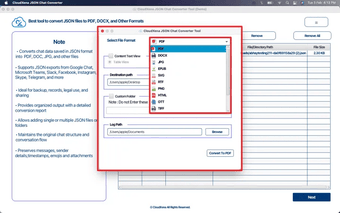
One of the primary strengths of the software is its extensive format compatibility. JSON documents can be exported to PDF for printing and sharing, DOCX for editing in word processors, HTML for web publishing, TXT for plain text output, CSV for spreadsheet applications, XML for data exchange, and several popular image formats such as PNG, JPG, BMP, TIFF, GIF, SVG, and WEBP. This broad compatibility helps users prepare information for different platforms and use cases.
Batch processing saves valuable time when handling large collections of files. Instead of opening and exporting each document individually, multiple JSON files can be processed in a single operation. This feature is particularly useful for developers, analysts, researchers, businesses, and organizations that regularly manage structured datasets.
The software focuses on preserving the logical structure of JSON content during export. Keys, values, nested objects, and arrays are presented in an organized manner, making the resulting files easier to read and understand. This is especially beneficial when creating documentation, reviewing datasets, or sharing information with colleagues who may not work directly with JSON.
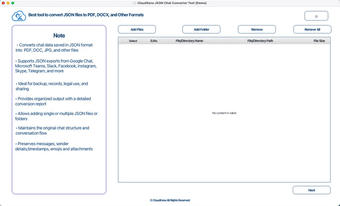
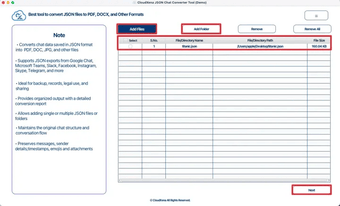
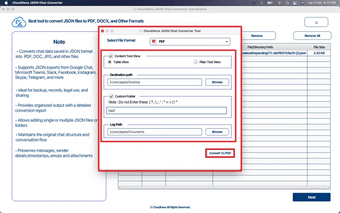
A clean and intuitive interface simplifies navigation. Users can quickly add files, choose an output format, select a destination folder, and start the export process with only a few steps. The layout minimizes unnecessary complexity while providing access to essential options for everyday tasks.
Offline functionality allows the application to operate without requiring an internet connection after installation. This makes it suitable for environments where privacy, security, or limited connectivity is important. Sensitive data remains on the local computer throughout the export process, helping organizations maintain control over their information.
The software is useful across a variety of industries and professions. Software developers can generate documentation from configuration files, data analysts can prepare structured datasets for reporting, educators can create teaching materials, students can convert project files into presentation-ready formats, and business professionals can share information with clients and team members using widely supported document types.
Support for image output enables users to create visual representations of structured information for presentations, tutorials, reports, and online content. HTML export provides an easy way to publish formatted data on websites, while spreadsheet-compatible formats simplify importing information into data analysis tools.
Performance has been optimized to process files efficiently while maintaining consistent output quality. Whether working with a single document or a larger collection, the application provides reliable results with minimal effort. The software is designed to reduce repetitive manual work and improve productivity during routine data management tasks.
Loading…
App specs
License
Demo
Version
26.1.0
Latest update
Platform
Mac
Other platforms (1)OS
macOS 10.15
Language
English
Size
273.20 MB
Developer
- CloudXena
- More programs (20)
Also available in other platforms
CloudXena JSON Converter Tool for Mac
- Demo
- 4.91
- V26.1.0
Download for Mac
View an ad to download for free
User reviews about CloudXena JSON Converter Tool
Have you tried CloudXena JSON Converter Tool? Be the first to leave your opinion!
Add reviewTop downloads Utilities & Tools for Mac
Top downloads Utilities & Tools for Mac
Top downloads Utilities & Tools for Mac
Related topics about CloudXena JSON Converter Tool
Latest articles

Avowed is still worth playing in 2026: 6 fantasy RPGs to try next
WhatsApp beta could add birthday reminders: alerts for your contacts

Motor City hits theaters in under two weeks: Alan Ritchson goes dark

Where to watch the Norway vs England match for free? Channels, streaming, and schedule

Tabby’s Star may have a giant-planet culprit: new study on its dimming
Laws concerning the use of this software vary from country to country. We do not encourage or condone the use of this program if it is in violation of these laws. Softonic may receive a referral fee if you click or buy any of the products featured here.